Best Antidetect Browsers for Creators in 2026
July 14, 2026 · 8 min read · By Exclu Team
Looking for the best antidetect browser for running multiple social media accounts in 2026? Here's the short version.
 We compared pricing, free tiers, profile limits, and fingerprint-spoofing depth across the seven biggest names in the anti detect software space, with an eye specifically on creators and social media managers juggling several Instagram, TikTok, or client accounts at once. Dolphin Anty comes out on top - it's the only tool here with a genuinely usable free plan, a built-in traffic marketplace, and pricing that scales sanely from solo creator to agency.
Ranked list:
Dolphin Anty - best overall, best free tier (5 profiles, no credit card)
GoLogin - best for cloud teams and API automation
Multilogin - most mature fingerprint engine, built for ad agencies
Incogniton - best budget pick for beginners
Octo Browser - best fingerprint quality for advanced anti-fraud evasion
AdsPower - best for e-commerce and affiliate multi-accounting
Ghost Browser - cheapest, but not a true anti fingerprint browser (session isolation only)
If you just need to run a handful of social accounts without one flagging the others, Dolphin Anty's free plan will cover you. If you're scaling past 50–100 profiles with a team, GoLogin or Multilogin make more sense. Details below.
What is an antidetect browser, and do you actually need one?
An antidetect browser (also called an anti detect browser or anti fingerprint browser) is a modified browser that lets you run dozens or hundreds of isolated profiles, each with its own unique digital fingerprint - canvas hash, WebGL renderer, fonts, timezone, screen resolution, WebRTC IP, and more.
For creators and social media managers, this is the tool that actually solves the "why did my second account get flagged" problem. If you're logging into a client's Instagram, your own TikTok, and a backup account from the same laptop, the platforms can tell - and one banned account can drag the others down with it.
Regular incognito mode doesn't do this. It clears cookies, sure, but sites like Instagram, TikTok, or Amazon can still fingerprint your GPU, your installed fonts, and your hardware config to link "anonymous" sessions back to your one real device. That's browser fingerprinting - a tracking method that survives cookie clearing because it reads hardware and software signals your browser exposes by default, according to Mozilla's own explainer.
Anti detect software works by intercepting those signals and feeding each browser profile a slightly different, consistent set of values - so profile #1 looks like a Windows laptop in Berlin, profile #2 looks like a MacBook in Lisbon, and neither ever gets tied back to you.
The 7 best antidetect browsers, reviewed
1. Dolphin Anty - Best overall
Dolphin Anty is a free antidetect browser at heart - the permanent free tier gives you 5 profiles with no credit card and no time limit, which is more generous than almost every competitor on this list. It's Chromium-based, spoofs canvas/WebGL/WebRTC/fonts, and syncs cookies and cloud profiles across a team.
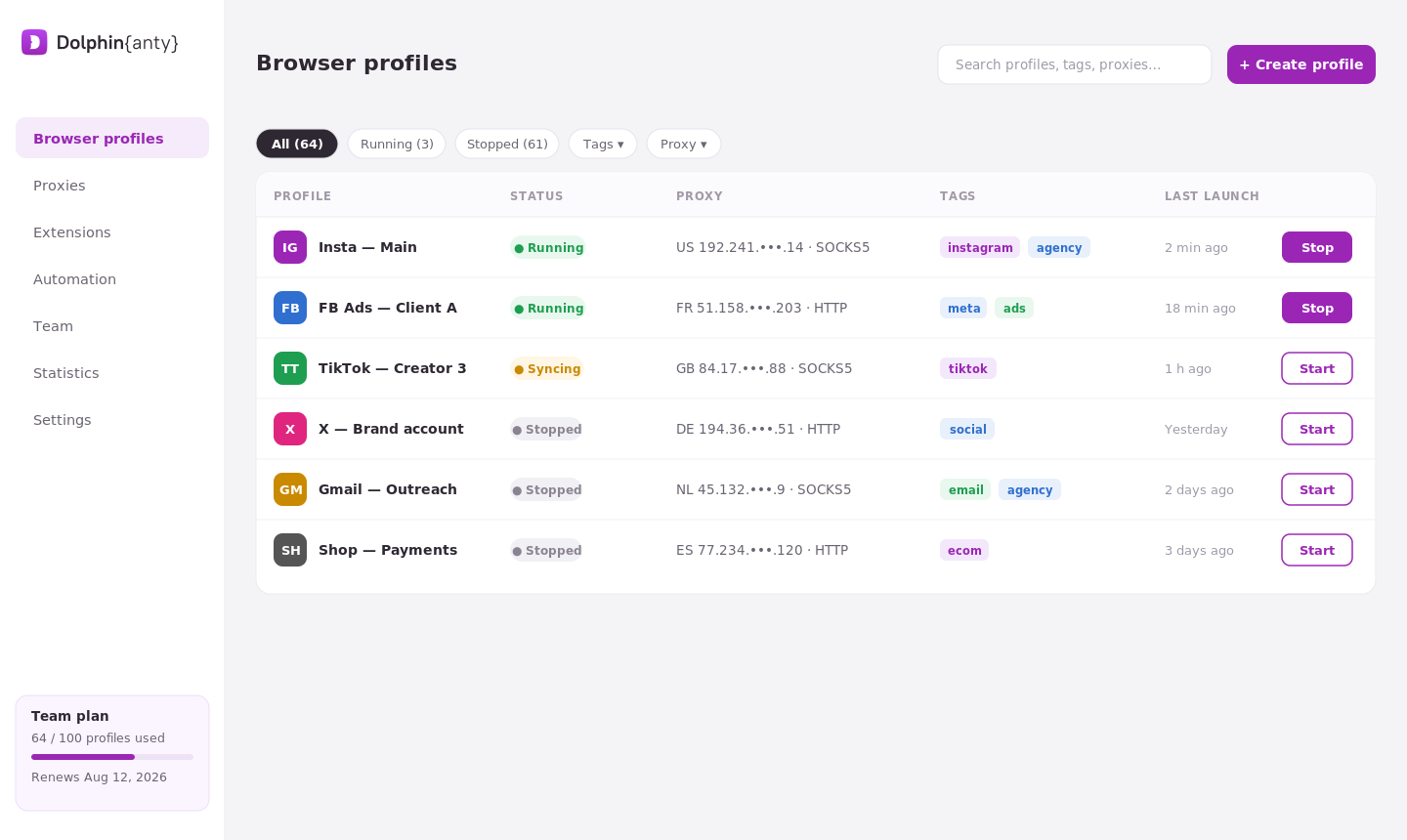 What pushes it to #1 isn't just the free tier - it's the built-in traffic marketplace for buying residential/mobile proxies without leaving the app, plus a scenario builder for automating repetitive logins across profiles. Paid plans start at $10/month (Starter, 20–60 profiles) and scale to Base ($89, 100 profiles), Team ($159, 300 profiles), and Enterprise ($299, unlimited). Annual billing knocks up to 40% off.
Best for: solo creators, social media managers, and small agencies who want a free start with room to grow.
2. GoLogin - Best for cloud teams
GoLogin's Forever Free plan covers 3 profiles, which is tight - but it's the cloud infrastructure that makes GoLogin worth the jump to paid. Profiles launch from GoLogin's own cloud servers, not just your local machine, so a whole team can spin up sessions without syncing files around.
The GoLogin antidetect browser also ships with a documented REST API, which matters if you're automating logins with Selenium or Puppeteer at scale. Paid tiers: Professional ($49/mo, 100 profiles), Business ($99/mo, 300 profiles), Enterprise ($199/mo, 1,000 profiles) - all roughly half-price if you pay annually.
Best for: distributed teams running profiles from the cloud, and anyone automating logins programmatically.
3. Multilogin - Most mature fingerprint engine
Multilogin has been around since 2016 and it shows - the fingerprint spoofing is deep, covering Tranco-verified browser fingerprints that mimic real device statistics rather than generating random-looking (and therefore flaggable) values. It's the tool most affiliate and ad-buying agencies default to when accuracy matters more than price.
Pricing runs from a €1.99 three-day trial (5 profiles) up through Pro 10 (€9/mo), Pro 50 (€25–29/mo), Pro 100 (€35–49/mo), and Business plans from €75/mo for 300+ profiles with unlimited team seats.
Best for: ad agencies and affiliates who need fingerprints that survive strict anti-fraud systems, not just basic detection.
4. Incogniton - Best budget pick
Incogniton's free plan technically gives you 10 profiles for the first two months, then drops to 3 unless you upgrade - a bit of a bait-and-switch, but the paid entry point is still cheap: Starter is $19.99/month for 10 profiles, no automatic downgrade. Entrepreneur ($29.99/mo, 50 profiles) adds API access; Professional ($79.99/mo, 150 profiles) supports 3 team users.
It's not as polished as Dolphin Anty or GoLogin, but if you just need reliable proxy and cookie management without paying for features you'll never touch, it's a solid entry point into anti detect software.
Best for: beginners testing multi-accounting on a tight budget.
5. Octo Browser - Best fingerprint quality for anti-fraud evasion
Octo Browser skips the free plan entirely - the cheapest option is the Lite plan at €10/month for just 3 profiles (as low as €7/month billed annually). What you're paying for is fingerprint precision: Octo's engine is popular specifically among users who need to pass strict anti-fraud checks on payment platforms and marketplaces, not just social logins.
Base plan (€79/mo) unlocks API access for 100–200 profiles; Team (€169/mo) adds up to 6 seats for 350–600 profiles.
Best for: users prioritizing fingerprint accuracy over cost, especially for e-commerce or fintech multi-accounting.
6. AdsPower - Best for e-commerce and affiliates
AdsPower's free plan is the leanest here - just 2 profiles, permanently, no credit card. But it includes full fingerprint customization and RPA automation bots even on the free tier, which most competitors reserve for paid plans. The Professional plan starts at $9/month ($5.40 annually) for 10+2 profiles.
AdsPower leans heavily into e-commerce and affiliate marketing use cases - bulk account creation tools, synchronizer features for team cookie-sharing, and integrations built for running dozens of seller or affiliate accounts at once.
Best for: affiliate marketers and e-commerce sellers managing many storefront or ad accounts.
7. Ghost Browser - Cheap, but not a real anti fingerprint browser
Worth including because it ranks in searches, but Ghost Browser needs a caveat: it's session isolation, not fingerprint spoofing. It gives you color-coded, cookie-separated tabs and workspaces, but canvas, WebGL, and audio-context fingerprints stay identical across every "identity." A site running serious fingerprint detection can still link your sessions back to one device.
Free plan gives 3 identities; Basic is $21/month for unlimited identities (still no separate proxy per tab); Pro at $46/month finally adds proxy control per identity.
Best for: basic multi-account convenience on sites with weak fingerprinting - not for anything that actually checks device fingerprints.
Comparison table
Browser | Free tier | Starting paid price | Profile limit (entry plan) | Best for |
|---|---|---|---|---|
Dolphin Anty | 5 profiles, free forever | $10/mo | 20–60 | Overall pick, creators & agencies |
GoLogin | 3 profiles, free forever | $49/mo ($24 annual) | 100 | Cloud teams, API automation |
Multilogin | 5 profiles, 3-day trial (€1.99) | €9/mo | 10 | Ad agencies, affiliates |
Incogniton | 10 profiles (2 months), then 3 | $19.99/mo | 10 | Budget beginners |
Octo Browser | None | €10/mo (€7 annual) | 3 | Anti-fraud evasion accuracy |
AdsPower | 2 profiles, free forever | $9/mo ($5.40 annual) | 10+2 | E-commerce, affiliates |
Ghost Browser | 3 identities | $21/mo | Unlimited (no fingerprint spoofing) | Basic session isolation only |
Prices and profile limits change often - always confirm on the vendor's own pricing page before buying.
Why creators and social media managers need an antidetect browser
If you manage more than one Instagram, TikTok, or Facebook account for clients, you've probably hit this wall: log into a second account from the same laptop, and the platform flags it as suspicious - sometimes it locks the account outright, sometimes it just silently tanks your reach.
That's fingerprint-based multi-account detection, and it's why agencies and freelance social media managers reach for anti detect software even outside the ad-fraud and e-commerce world it was originally built for.
Typical use cases:
Agency account management - running 10–50 client social accounts without cross-contamination, so one client's ban risk never touches another's.
Influencer/UGC accounts - testing content on backup or "spam" accounts before posting to a main brand account.
Affiliate and dropshipping accounts - managing multiple seller or ad accounts on the same platform (Amazon, Meta Ads, TikTok Shop) without triggering duplicate-account bans.
Team collaboration - sharing login access to client accounts across a team without sharing passwords or triggering "new device" security flags every time someone logs in.
For most creators managing under 10 accounts, a free antidetect browser like Dolphin Anty's or AdsPower's free tier is genuinely enough. Once you're past 20–30 profiles or managing a team, budget for one of the paid plans above - the cost is usually far cheaper than losing a client account to a ban.
FAQ
What is the best free antidetect browser? Dolphin Anty's free plan (5 profiles, no credit card, no time limit) is currently the most generous free tier among major anti detect browsers. AdsPower's free plan (2 profiles) is thinner but includes full fingerprint customization.
Is Dolphin Anty really free? Yes - the free plan is permanent, not a trial, and includes basic fingerprinting and proxy support for up to 5 profiles. You can also buy extra individual profiles for $1 each if you need more without upgrading.
What's the difference between GoLogin and Multilogin? GoLogin leans cheaper and cloud-first, with profiles launchable from GoLogin's servers and a lower entry price ($49/mo vs Multilogin's roughly comparable Pro tiers). Multilogin's fingerprint engine is generally considered more mature and is favored by agencies running stricter anti-fraud checks.
Are antidetect browsers legal? Yes, using an antidetect browser is legal in most jurisdictions - it's a privacy and multi-accounting tool, similar to a VPN. What you do with the accounts you manage (violating a platform's terms of service, running fraud, etc.) is a separate matter and can still get accounts banned or, in fraud cases, be illegal regardless of the browser used.
Is Ghost Browser an antidetect browser? Not really. Ghost Browser isolates sessions and cookies but doesn't spoof canvas, WebGL, or audio fingerprints. Platforms with serious fingerprint detection can still link Ghost Browser "identities" back to the same device.
How many profiles do I actually need as a social media manager? Most solo creators or freelancers managing 3–5 client accounts can stay on a free tier (Dolphin Anty or AdsPower). Agencies managing 10+ clients typically need a paid plan with 50–300 profiles, like Dolphin Anty's Base/Team tiers or GoLogin's Business plan.